

A cloaking server setup is a configuration that decides which page a visitor sees based on who the visitor appears to be. In advertising, that usually means one page for ad reviewers and bots and another for real users. Platforms treat that as a policy violation, so any setup has to be judged by what it protects and what it puts at stake. This guide explains how these servers are built, what Google and Meta say about them, what enforcement looks like, and which server-side practices are safer for CBD, crypto, peptide, kratom and other restricted advertisers.
TL;DR
- A cloaking server routes visitors to different content depending on whether they look like a reviewer, a bot or a real user.
- Google defines this as showing different content to different users, including Google, and says detected accounts are suspended without prior warning.
- Meta requires the ad to match the landing page and prohibits helping anyone evade enforcement, so consistency is the baseline for every platform.
- Compliant server work (safe landing pages, correct disclosures, click tracking, clean infrastructure) solves many rejections without the enforcement risk.
- Before you spend on any setup, audit the landing page and the offer against the platform rules for your category.
Table of Contents
- What a cloaking server actually is
- Why marketers consider it
- What the platforms say
- What enforcement looks like
- Why a setup can fail even when it works
- What a server setup includes
- Compliant server-side practices
- Category rules to check first
- If your ad was disapproved or your account suspended
- Our perspective
- How we can help
- FAQ
- Sources
What a cloaking server actually is
Strip away the vocabulary and a cloaking server is a gatekeeper that sits in front of a landing page. When a request arrives, it checks signals such as the IP address, the user agent, the location, the device and the traffic pattern. Then it serves one of two pages.
Google Ads Help describes the practice plainly: cloaking is showing different website content to different users, including Google, to hide content that may break its rules. Its own example is a compliant clothing page shown to Google while users see guns. The same definition applies whether the server is a rented VPS, a managed tracker or a custom script.
It helps to separate this from things that look similar:
- Link cloaking for affiliates. Masking a long tracking URL behind a branded short link is cosmetic. It does not change what the reviewer or user sees. Our explainer on link cloaking versus ad cloaking covers the difference.
- Geo or language routing. Sending a visitor in Spain to the Spanish page is ordinary localization, as long as every visitor in that group sees the same thing, reviewers included.
- Ad cloaking. Serving a different page to reviewers than to users. This is the practice that platforms prohibit.
Why marketers consider it
The reason is rarely curiosity. A marketer in CBD, peptides, kratom, supplements, crypto or forex has a legitimate business, runs into a rejection or a suspended account, and cannot see a clear path to approval. Restricted categories often get blanket limits, vague disapproval messages and appeals that go nowhere. When the budget is already committed, a server that promises to “get past review” looks like a shortcut.
That pressure is real, and we see it in nearly every conversation with a new client. The problem is what the shortcut costs. The sections below show how platforms define the violation and what follows when it is detected. Most of the time, the rejection that pushed the marketer toward cloaking has a fixable cause on the landing page, in the claims or in the account history.
What the platforms say
Google’s advertising policy lists cloaking, hiding the true destination, bridge or gateway destinations, and manipulating settings to circumvent policy review as examples of abusing the ad network. Its misrepresentation policy goes further and bars destinations that deceive users by omitting relevant product information or giving misleading information about products, services or businesses.
The same policy gives concrete misrepresentation examples: obscured billing details, unavailable offers, missing tax or licence numbers where relevant, missing contact information or physical address, and misleading weight-loss or financial-gain claims. If your page does any of these, a server cannot fix it honestly.
Meta
Meta’s Advertising Standards require ads to clearly represent the advertised company, product, service or brand, and the promoted product or service has to match the landing page. The same document prohibits helping anyone evade or circumvent enforcement of its policies or terms. Meta’s whole approach rests on consistency between advertiser identity, ad components and the offer on the landing page.
If you run Facebook or Instagram ads, our guide to Facebook ad cloaking compliance fixes walks through the checks that matter before review.
Other platforms
Bing, Twitter (X), TikTok, Snapchat and YouTube each publish their own advertising rules, and each treats misleading destinations as a violation. We cover two of them in detail: Bing Ads cloaking and Microsoft policy and Twitter Ads cloaking checks before review. The pattern is the same everywhere: the platform wants the reviewer’s experience and the user’s experience to be one experience.
What enforcement looks like
Google states that accounts are suspended upon detection without prior warning, and the advertiser will not be allowed to advertise with Google Ads again. It also classes cloaking violations as egregious. That differs from a normal disapproval, where you edit the ad and resubmit.
On Meta, advertisers are responsible for complying with applicable laws and regulations, and consequences can include cancellation of placed ads and termination of the account.
For a business, the cost goes beyond one account. Lost ad spend, lost pixel and audience data, a burned payment method and a damaged domain all follow. A suspension for circumventing systems is also much harder to appeal than a content rejection. If you are already in that position, read our guide to recovering from an ad account suspension, and see the seven-step audit for circumventing systems suspensions to find what triggered it.
Why a setup can fail even when it works
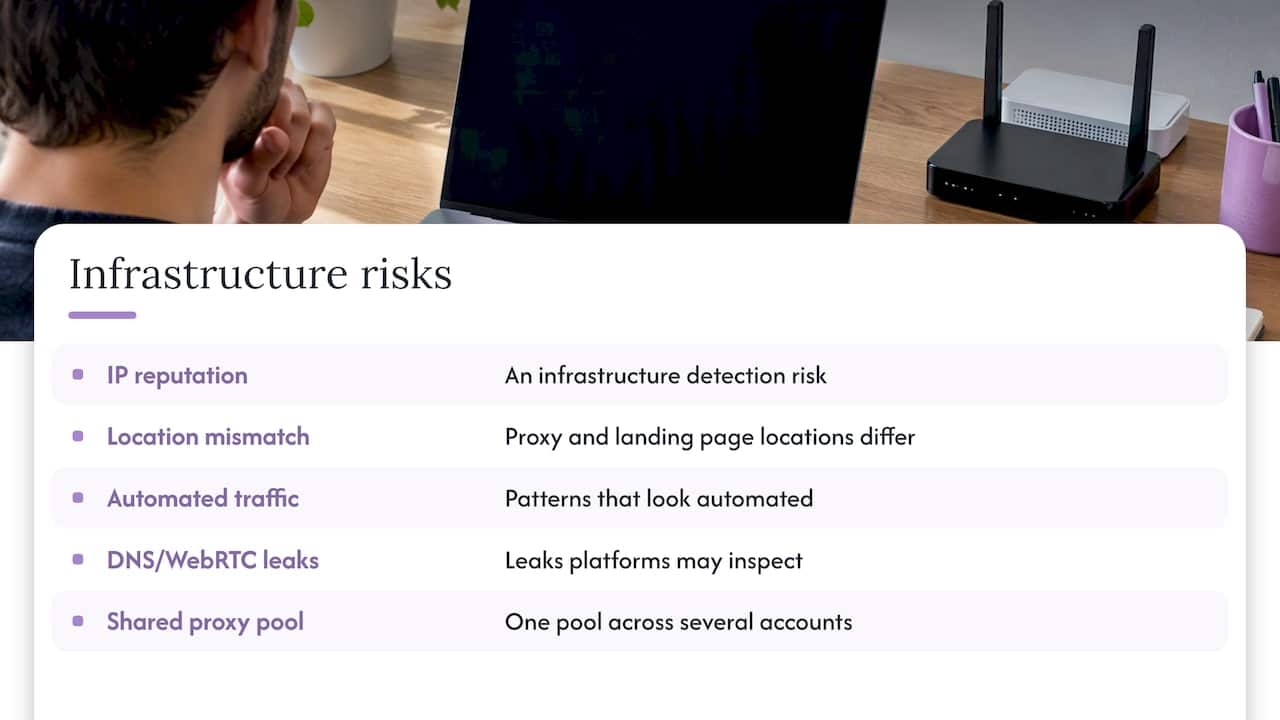
A common belief is that the risk lies only in the cloaking script. In practice, detection often comes from the infrastructure around it: IP reputation, a mismatch between proxy location and landing page location, traffic patterns that look automated, DNS or WebRTC leaks, and one proxy pool shared across several accounts. Pages ranking for this keyword make the same point: a cloaker can run correctly and the account can still be flagged because of the setup around it.
This is the honest reading of any server configuration. Each moving part is another thing a platform can inspect, and platforms change their detection without notice. Anyone who tells you a setup is permanently invisible is selling certainty that does not exist.
What a server setup includes
When a client asks us for a setup, the work falls into a few layers:
- Server configuration. Hosting, SSL, domain structure, and routing rules that are documented and testable.
- Safe landing pages. Pages built to meet the platform’s rules for the category: accurate product details, disclosures and contact information.
- Traffic filtering. Bot and reviewer detection, used to understand who is arriving and to keep fraudulent traffic out of your reporting.
- Account management. Ongoing monitoring of approvals, disapprovals and account health.
The second layer deserves the most attention. Search Engine Land’s guide to regulated categories recommends that sensitive-category landing pages carry accurate product details, disclaimers, limitations, risks or side effects, business identity and contact details, privacy and terms links, and clear pricing and billing information. A page built that way is what gets a restricted advertiser through review over time.
Our bridge page design guide shows two compliant templates for the pages that sit between an ad and an offer.
Compliant server-side practices
Not every server technique is a problem. Google states that click trackers and redirects are permitted when they are not used to hide conduct or content that violates its policies. Legitimate server work includes:
- HTTPS everywhere and clean, consistent domain setup.
- Certified click tracking and server-side conversion tracking, with correct deduplication.
- GeoIP-based targeting and localization that every visitor, reviewer included, experiences the same way. Open-source ad server documentation describes HTTPS, GeoIP middleware and decision backends that rank ads by CPM, CPC or relevance as ordinary building blocks.
- Making every page of the site accessible to Google’s crawlers.
- Fraud and bot filtering for analytics, not for hiding a different page from the platform.
The test is simple. If a platform reviewer visited your page from their own network, would they see what a customer sees? If the answer is yes, you are in compliance territory. If the setup only works because the answer is no, you are in the territory the policies describe above.
Category rules to check first
Most rejections in restricted verticals trace back to claims and disclosures, not to server settings.
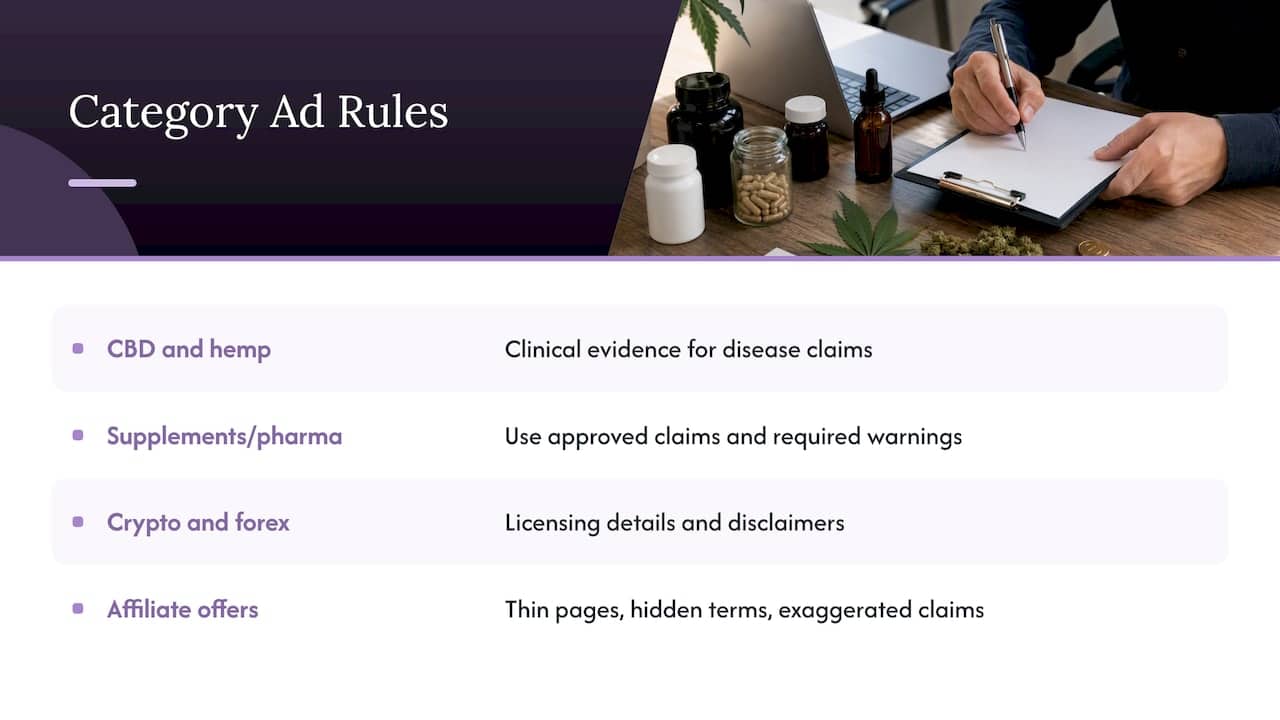
CBD and hemp. The FTC’s September 2019 warning letters state that disease claims require competent and reliable scientific evidence, including well-controlled human clinical studies when appropriate. That requirement also covers indirect claims made through product names, website names, metatags and consumer endorsements. A February 2020 FTC stipulated order likewise required human clinical testing, or testing of an essentially equivalent product, to substantiate specified disease or pain claims. See our page on CBD, hemp, kratom and vape ad approval and the kratom ads approval rules.
Supplements, peptides and pharma. Search Engine Land’s guide says pharmaceutical advertisers should use approved claims and required warnings. For pills and medicines, see our pharma ads page.
Crypto and forex. The same guide says financial advertisers should include licensing information and disclaimers. Missing licence details are a common reason for rejection, and Google runs a certification process for some financial and regulated services. Our Google Ads license service guide explains the setup.
Affiliate offers. Thin pages, hidden billing terms and exaggerated claims draw rejections quickly. Our affiliate ads compliance rules and five compliance fixes for affiliate approval list what to change.
If your ad was disapproved or your account suspended
Google’s guidance is practical. Check whether the site was hacked, use certified click trackers, make all site pages easily accessible to Google, and make sure users are not sent to policy-violating content. When you appeal, explain the situation and the steps you took, and be thorough, accurate and honest.
A sensible order of work:
- Read the exact policy named in the disapproval, not a summary of it.
- Compare your ad text, landing page and checkout against that policy line by line.
- Remove unsupported claims, add missing business details and disclosures, and check that billing terms are visible before payment.
- Document every change with dates and screenshots.
- Appeal once, with the documentation, rather than resubmitting repeatedly.
Our article on why audits beat bypass attempts in restricted industries lays out the same sequence for advertisers who feel tempted to skip it.
Our perspective
We build and run these systems for clients in restricted verticals, so we talk to advertisers on the day their account is rejected, and we know how strong the pull toward a quick fix is. Here is what we tell them.
First, a server is a tool, not an approval. The platforms’ stated rules are about consistency, and we say so before any setup begins. We would rather a client leave the first call with an audit list than with a configuration that puts their domain and payment methods at risk.
Second, the best results we see come from combining solid landing pages, clean infrastructure and steady account management. Our service covers server configuration, safe landing pages, bot and reviewer detection and ongoing ad account management across Google, Facebook, TikTok, Bing, YouTube, Twitter and Snapchat, and we scope each engagement to the category and platform. We describe the technique frankly in our overview of cloaking ads and in cloaking versus compliance, including what restricted advertisers risk.
Third, no one controls a platform’s enforcement. Any plan that depends on a platform never looking closely will eventually fail, and you should price that in.
— Umar
How we can help
If you want a second opinion before you commit budget, start with a consultation call. We review your category, platform, landing page and account history, and tell you what we would change first. There is no published price for the call; details are on our main page.
For the infrastructure itself, the setup cloaking system package is published at 1599 as a one-off payment. For a managed engagement that covers setup and ongoing account work, the Done-For-You package is published at 3599 one-off. Our restricted niche page lists the verticals we work in.
FAQ
Is a cloaking server setup legal?
The software is not illegal, but using it to show reviewers different content than users breaches the advertising rules of Google and Meta. Separately, the claims on the page you serve to users must still follow consumer protection law, such as the FTC’s rules on health claims in the United States. Talk to a lawyer who handles advertising law if your category is regulated.
What happens if a platform detects cloaking?
Google says accounts are suspended upon detection without prior warning and that the advertiser is not allowed to advertise with Google Ads again. Meta can cancel ads and terminate the account. Appeals for these violations are far harder than for ordinary content rejections.
Can I use a server to track clicks or redirect traffic?
Yes, within limits. Google permits click trackers and redirects when they are not used to hide conduct or content that violates its policies. The deciding factor is whether the reviewer and the user see the same destination.
What should I fix first if my CBD or peptide ads keep getting rejected?
Start with the claims and the page. Remove disease or treatment claims you cannot substantiate, add business identity, contact details and clear pricing, and check that the ad matches the landing page. Then compare the result against the specific policy named in the rejection.
Sources
- Google Ads Help: cloaking and account suspension
- Meta Advertising Standards
- Google Ads policies overview
- FTC warning letters to CBD companies, 2019
- FTC v. Excellent Marketing Results stipulated order, 2020
- Search Engine Land: Google Ads for regulated and sensitive categories
- Ethical Ad Server configuration documentation