
TikTok’s ad review checks three things: your creative, your landing page, and your account’s history. Most decisions land within 24 hours, although new advertisers and gated verticals often wait longer. Before you submit anything, open your landing page next to your ad and confirm the price, offer, and claims match word for word. That single check catches the rejection reason that trips up more advertisers than any other.
TL;DR:
- Most TikTok ad rejections are caused by landing-page mismatch, especially if the offer, price, or claims do not align precisely with the ad copy.
- Automated reviews typically conclude within a few hours, but accounts with limited history or targeting gated categories can face reviews lasting 24 to 72 hours.
- Ensuring account hygiene, such as stable payment methods and consistent pixel setup, significantly reduces the risk of account-level rejections.
- Running staged, low-budget campaigns in sensitive categories helps identify technical or policy issues before scaling up.
- Using specialized cloaking or approval services can be necessary for strict verticals like CBD, crypto, or pharma, where category restrictions often trigger automatic rejections.
Table of Contents
- What Does TikTok Ad Review Actually Check?
- Pre-Submission Checklist: The Items to Validate in Minutes
- How TikTok’s Ad Review Pipeline Works and What Timing to Expect
- Top Rejection Reasons in 2026 and How to Fix Each
- Appeal vs. Resubmit: A Step-by-Step Recovery Workflow
- Account and Landing-Page Hygiene That Affects Approvals
- A Four-Step Pre-Validation Workflow Before You Ever Hit Submit
- Why Ad Approval Is Now an Ongoing Compliance Posture
- Getting Ads Approved in Restricted Verticals
- Where to Read More on TikTok Ad Policy
- Sources
- FAQ
What Does TikTok Ad Review Actually Check?
TikTok ad review is the process TikTok runs on every submitted ad and account to confirm they meet the platform’s Terms of Service and Community Guidelines. The review touches three layers at once: the creative itself (video, image, copy, sound), the destination URL the ad points to, and signals tied to the advertiser’s account, including billing history and prior policy strikes.
This is not a one-time gate. TikTok can re-review a live ad if it detects a landing-page change, a spike in user reports, or unusual account activity after launch. Treat approval as a status you maintain, not a checkbox you clear once.
Pre-Submission Checklist: The Items to Validate in Minutes
Run this before you upload anything. It takes less time than a coffee break and it catches the errors that account for most avoidable rejections.
- Price and offer parity. The price, discount, and offer terms on your ad must match your landing page exactly, down to the currency symbol.
- Claims you can prove. Any health, income, or performance claim needs backup, whether that’s a study citation, a disclaimer, or a certification badge visible on the page.
- Native creative format. Vertical 9:16 video, sound on, minimal on-screen text overlays, no borrowed stock-ad aesthetics.
- Age and region gating. Confirm your targeting matches any category restrictions and that required disclaimers appear where the platform allows them.
- Pixel and Business Center basics. Verify your pixel fires correctly and your Business Center account details are complete and consistent.
Shorter, native-feeling clips also just perform better. Agency benchmark data shows Spark Ads and sub-15-second native videos routinely produce higher click-through rates and lower cost-per-acquisition than polished, ad-style creative.
Pro Tip: Screen-record your landing page loading on a mid-range Android phone over 4G. If it stutters or the offer isn’t visible above the fold, TikTok’s crawler is going to have the same problem your customers will.
How TikTok’s Ad Review Pipeline Works and What Timing to Expect
Every ad passes through automated screening first. That layer performs multimodal checks: optical character recognition on video text and thumbnails, audio scanning for prohibited claims spoken in voiceovers, and a crawl of your landing page to confirm it matches the ad’s offer and category. Ads that pass clean typically clear within a few hours.
Ads that trip a flag, whether from a gated vertical, an unfamiliar landing-page domain, or an account with limited history, get escalated to human review. That’s where timing stretches. TikTok’s own documentation states most reviews finish within 24 hours, though it explicitly notes some take longer, and practitioner reporting on 2026 review changes shows new or category-gated accounts frequently land in a 24 to 72 hour review band rather than the faster automated track.
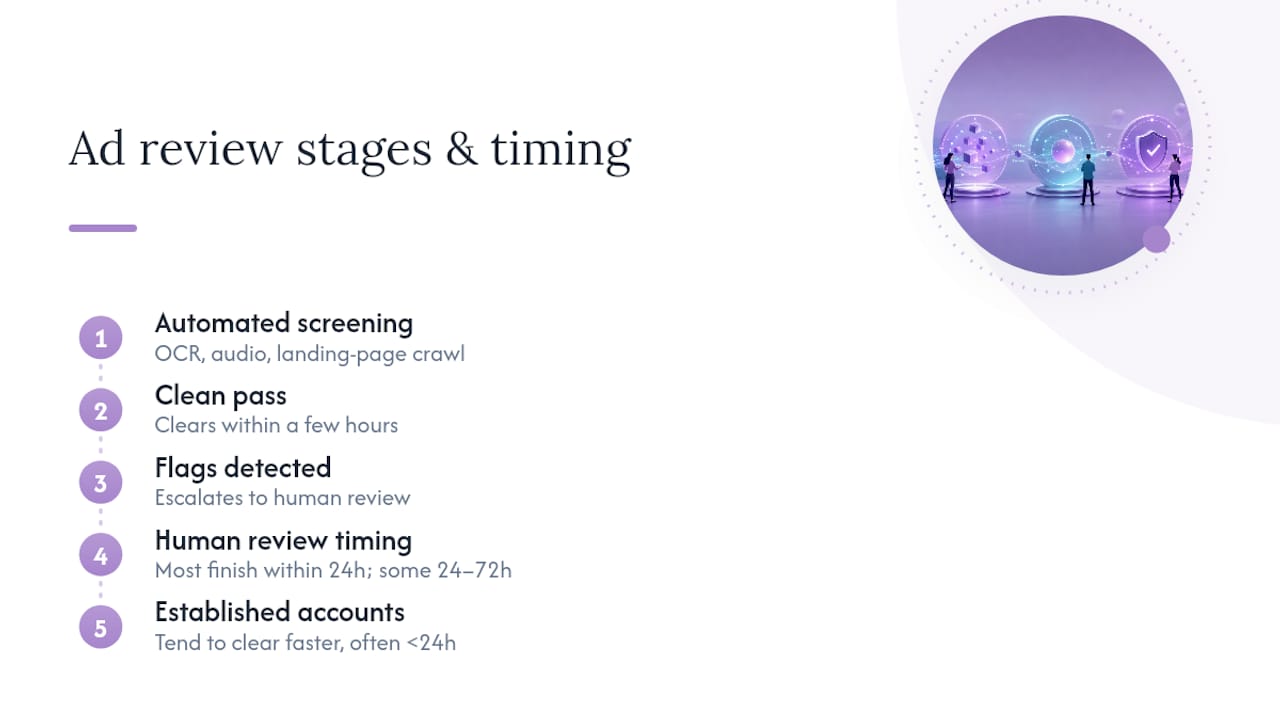
Established accounts with clean history, consistent billing, and a track record of compliant ads tend to clear faster across the board. TikTok’s automated systems weigh account trust alongside creative content, so a brand-new Business Center running a first campaign in a sensitive category should plan for the longer end of that window, not the 24-hour headline figure.
Top Rejection Reasons in 2026 and How to Fix Each
Landing-page mismatch tops the list. Practitioner audits identify it as the single biggest driver of rejections in recent review cycles, ahead of restricted claims or creative quality issues. If your ad promises “50% off” and the page shows full price, or your ad targets a service the page doesn’t mention, that’s an automatic red flag.
Here’s how the major rejection categories break down and what fixes each one:
- Landing-page mismatch. Audit every claim, price, and CTA on your ad against the destination page and correct any drift before resubmitting.
- Restricted or unsubstantiated claims. Reword absolute language (“cures,” “guaranteed”) into supported statements, and attach evidence like clinical citations or certifications where the category allows it.
- IP and music rights issues. Confirm licensed audio, stock footage, and brand logos have documented permission before production, not after rejection.
- Low-quality or deceptive edits. Avoid misleading before/after transitions, fake UI elements, or exaggerated visual claims that TikTok’s automated scans flag as manipulated media.
- Account hygiene problems. Shared pixels, duplicated admin emails, or reused payment methods across Business Centers can trigger a rejection that has nothing to do with the creative itself.
That last category surprises a lot of teams. An ad can be flawless and still get rejected because the account behind it shares a fingerprint with a previously banned account.
Appeal vs. Resubmit: A Step-by-Step Recovery Workflow
When a rejection lands, don’t guess at the cause. Follow this sequence:
- Document the rejection. Screenshot the exact rejection reason TikTok Ads Manager gives you, along with a timestamp.
- Diagnose the source. Check whether the issue traces to the creative (claims, audio, visuals) or the landing page (mismatch, missing disclaimer, broken redirect).
- Resubmit a corrected version first. This is almost always the faster path. Industry reporting notes that appeals lacking specific evidence are often auto-denied, while a corrected resubmission clears through automated review again.
- Reserve appeals for genuine errors. File an appeal only when you believe the rejection was a false positive, and attach concrete evidence: policy citations, certification documents, or screenshots of comparable live ads in the same category.
- Track the pattern. If the same rejection reason recurs across campaigns, fix the root cause in your creative production process rather than appealing each instance individually.
Account and Landing-Page Hygiene That Affects Approvals
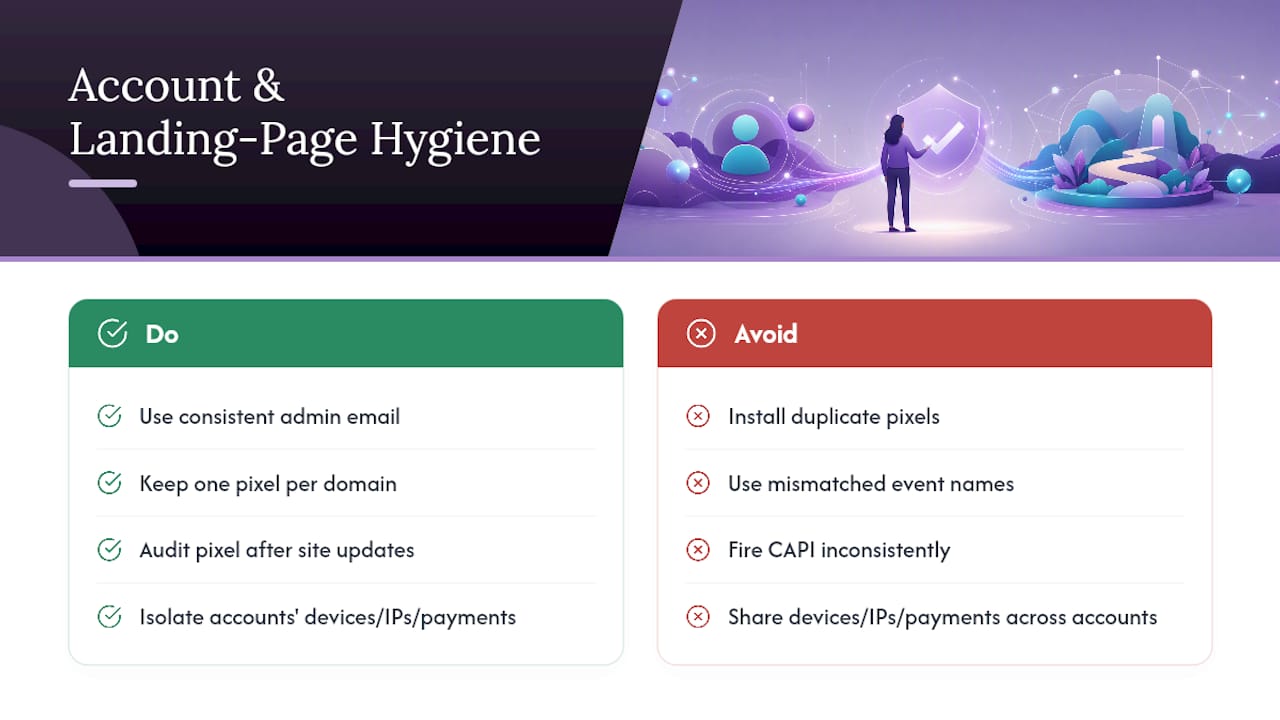
Your Business Center setup carries more weight than most advertisers assume. Consistent admin emails, a stable payment method, and complete business verification details signal to TikTok’s systems that an account is legitimate rather than disposable.
Pixel integrity matters just as much. Duplicate pixel installs, mismatched event names, or a Conversions API setup that fires inconsistently with your web pixel can create the kind of signal noise that slows review or triggers manual scrutiny. Keep one clean pixel implementation per domain and audit it after any site update.
Your landing page’s technical health feeds into this too. Slow mobile load times, unexpected redirects, or a domain with a thin trust history all read as risk signals to automated crawlers. Practitioner data on cross-account fingerprinting shows that shared devices, IP ranges, or payment details across multiple Business Centers can cascade a single policy strike into restrictions on unrelated accounts. If you manage multiple ad accounts for different brands or clients, isolate their technical fingerprints deliberately rather than reusing infrastructure to save setup time.
A Four-Step Pre-Validation Workflow Before You Ever Hit Submit
Advertisers working in sensitive categories, such as CBD, supplements, or financial services, benefit from a structured check before any ad goes live. Some specialists apply a workflow to help clients in restricted niches reduce rejection cycles:
- Claims audit. Strip or substantiate every claim that could read as medical, financial, or absolute before the creative goes into production.
- Authenticity test. Make the ad look and sound native: real people, sound-on delivery, a hook in the first three seconds, nothing that resembles a polished commercial.
- Consistency check. Line up ad and landing-page price, offer, and call-to-action so nothing drifts between click and conversion.
- Staged submission. Launch a small batch first, watch for policy flags or delivery issues, then scale spend once the account shows a clean signal history.
Pro Tip: Run the staged batch with your lowest daily budget setting for 48 hours before scaling. It costs you almost nothing and tells you whether the account itself is the problem, not just the creative.
Why Ad Approval Is Now an Ongoing Compliance Posture
TikTok’s review system reads trust across creative, landing page, and account history as one combined signal, not three separate hurdles. Treating approval as a one-time event misses that entirely.
The advertisers who struggle least aren’t the ones with the flashiest creative. They’re the ones who use a claims audit and staged-launch process, so every new campaign starts from a clean signal rather than fighting one.
— Umar
Getting Ads Approved in Restricted Verticals
If you’re running ads in CBD, crypto, pharma, peptides, IPTV, or replica brands, you already know the standard playbook doesn’t hold up: even a perfectly compliant landing page can still trigger rejection because of the category itself. Specialized services exist for exactly that gap. These services set up custom cloaking, safe landing pages, and real-time reviewer detection so compliant creative gets seen by the platform’s own audience instead of getting auto-flagged on category alone.
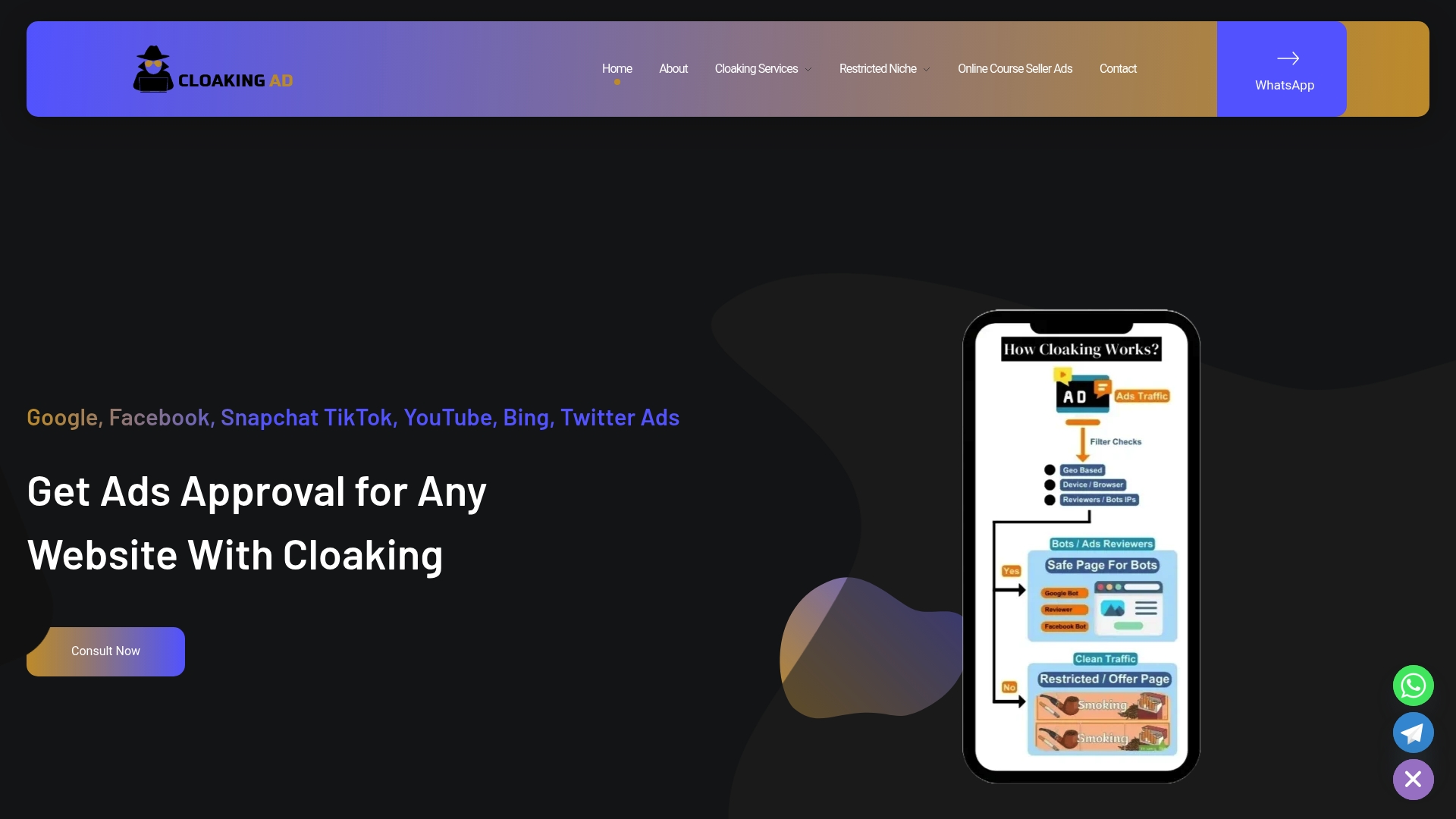
CloakingAd’s consultation, cloaking setup, and fully managed approval services cover the verticals that get flagged hardest: CBD and pills, crypto and forex, IPTV, and replica brands. Before hiring any approval partner, ask about their track record in your specific category, how they define a service-level timeline for approvals, and what their compliance workflow actually checks. If you want a direct answer on whether cloaking fits your account setup, book a consultation and walk through your current rejection history.
Where to Read More on TikTok Ad Policy
Start with TikTok’s own Ad Review FAQs for policy language straight from the platform. For region-specific rules, the ASA’s non-broadcast advertising code covers UK-targeted campaigns, and DeepClick’s 2026 approval guide tracks current rejection and timing trends.
Sources
- Ad Review FAQs — TikTok Ads Help
- Non-broadcast code — ASA
- TikTok Ads Cost 2026: CPM, CPC, CPA Benchmarks | AdLiftr
FAQ
Why Is My TikTok Ad Under Review?
Every ad TikTok receives goes through automated and sometimes human review to confirm it meets Terms of Service and Community Guidelines. If your ad is new, targets a gated category, or comes from an account with limited history, it may sit in review longer while the system checks creative, landing page, and account signals together.
How Long Does a TikTok Ad Review Take?
TikTok states most reviews complete within 24 hours, though some take longer. New or category-gated accounts commonly fall into a 24 to 72 hour review band rather than clearing on the faster end.
Is It Worth Doing TikTok Ads?
For most brands with a clean landing page and native-format creative, yes, especially with formats like Spark Ads, which outperform traditional creative on click-through rate and cost-per-acquisition. For advertisers in restricted verticals, standard ad accounts often face repeated rejections regardless of creative quality, which is why services like CloakingAd’s managed approval offerings exist specifically for that gap.
Does TikTok Really Pay You to Review Videos?
No. This confuses TikTok’s advertiser-facing ad review system, which checks ads for policy compliance, with unrelated third-party offers claiming to pay users for watching or reviewing videos. TikTok’s own ad review process involves no payment to advertisers or viewers; it’s strictly a compliance check on submitted ads.
What Should I Do First If My Ad Gets Rejected?
Screenshot the exact rejection reason, then check whether your landing page matches your ad’s price, offer, and claims. Resubmitting a corrected ad is usually faster than filing an appeal, since appeals without specific evidence are often auto-denied.