

Device cloaking serves different content to automated reviewers than to real users. It works technically because it exploits the gap between how platforms scan ads and how people browse, but both Google and Meta treat it as circumventing systems, with account suspension as the standard penalty. If you are running or considering this technique, audit your account exposure first and weigh a compliance-first setup or managed support before scaling spend.
TL;DR:
- Cloaking systems rely on multi-dimensional signals like IP, User-Agent, TLS fingerprints, and JavaScript timing to detect or evade real reviewers.
- Google and Meta classify cloaking as serious policy violations, risking instant, permanent suspension and asset-level penalties if detected.
- Most failures occur due to stale IP or ASN lists, inaccurate fingerprint emulation, or delayed updates, leading to detection after campaigns go live.
- Use interim tactics like removing problematic content and disclosing redirects, or seek managed support to reduce risks in high-restriction verticals.
- Legal risks depend on underlying product compliance and jurisdiction, separate from platform policy violations, emphasizing careful review of local laws.
Table of Contents
- What device cloaking means: pre-click versus post-click
- Technical anatomy: signals, fingerprints, and infrastructure behind cloaking
- How Google and Meta enforce cloaking policies
- Why cloaks break: common failure points and reviewer bleed-through
- Lower-risk tactics for restricted-vertical campaigns
- What a managed cloaking provider should actually deliver
- Legal implications and jurisdictional challenges
- Case patterns: how cloaking detection plays out on live campaigns
- Ethical considerations and how the industry views cloaking
- Pre-launch checklist: what to test before you scale spend
- Getting started with managed cloaking setup
- FAQ
- Sources
What device cloaking means: pre-click versus post-click
Device cloaking splits into two technical moments. Pre-click cloaking happens at the ad or tag level: the ad creative or tracking pixel itself detects whether the visitor is a platform reviewer or crawler and adjusts what loads before any click occurs. Post-click cloaking happens after the click, when the landing page route sends reviewers to a compliant “white page” and real users to the actual offer.
Not every content variation is deceptive. Platforms generally tolerate adjustments like language localization or geotargeted pricing. What triggers enforcement is intent: deliberately hiding a policy violation from the reviewer while showing it to paying customers.
- Pre-click: creative or pixel-level detection before any click happens.
- Post-click: landing page routing that splits traffic after the click.
- Legitimate variation: language, currency, or regional offer differences.
- Deceptive cloaking: hiding restricted content (unapproved claims, banned products) specifically from reviewers.
Operators most often attempt this in restricted verticals such as CBD, kratom, crypto, forex, pharma, and brand replicas, where the underlying offer routinely fails standard review.
Technical anatomy: signals, fingerprints, and infrastructure behind cloaking
Modern cloaking depends on reading multiple signals at once rather than a single header. Detection and evasion both rely on the same data points: IP address and ASN (does the request originate from a known data center or crawler range), User-Agent and User-Agent Client Hints, TLS fingerprints (JA3/JA4), canvas rendering fingerprints, touch and battery API checks, and JavaScript execution timing.
- IP/ASN lookups flag known reviewer and data center ranges.
- User-Agent and Client Hints parity checks catch mismatched device claims.
- TLS JA3/JA4 fingerprints expose the underlying HTTP client regardless of the UA string.
- Canvas and touch/battery checks distinguish real mobile hardware from emulated environments.
- JavaScript timing measures how fast a page executes, since headless browsers often behave differently than real devices.
Modern cloaking systems rely on multi-dimensional filtering, combining IP/ASN, User-Agent and Client Hints, TLS fingerprints, and JavaScript behavior, and they increasingly run this logic at the edge to cut latency, according to GeoEdge’s technical breakdown of ad cloaking. Running decision logic in an edge worker, rather than on a traditional origin server, shaves the redirect delay that would otherwise expose timing inconsistencies to a scanner.
Infrastructure behind these setups typically includes edge workers for real-time routing decisions, proxy fleets using residential or mobile IP pools to avoid data center flags, and antidetect browsers that spoof canvas and hardware fingerprints. The routing decision flow runs in milliseconds: a request arrives, the system checks IP/ASN against known crawler lists, cross-references UA and Client Hints, then serves either the white page or the real offer. Any delay in that chain is itself a signal reviewers can catch.
How Google and Meta enforce cloaking policies
Both major platforms treat cloaking as a severe, not incidental, violation. Google’s Circumventing systems policy classifies showing different content to Google than to users, specifically to hide a policy violation, as cloaking, and it names this an egregious violation that can lead to immediate and permanent account suspension with no warning period.
Meta’s Evading enforcement standard separately prohibits creating or running assets designed to dodge review, and violations typically result in advertising restrictions or asset-level penalties rather than isolated ad disapprovals.
- Google: egregious violation, can mean instant and permanent account suspension.
- Meta: evading enforcement can restrict advertising privileges and penalize linked business assets.
- Appeals rarely succeed once a platform has logged a cloaking determination, since the evidence is systemic, not a single ad.
- Enforcement often follows the business, not just the ad account: payment methods, domains, and linked Business Manager assets can carry the flag across platforms.
Account history compounds the risk. A single cloaking detection on a new account is costly, but the same detection on an account with years of spend and trust signals can trigger a deeper audit of every active campaign.
Why cloaks break: common failure points and reviewer bleed-through
Most cloaking failures come down to maintenance, not design. Lists of crawler IP ranges and ASNs go stale as platforms rotate infrastructure, and a missed update lets a reviewer load the real offer page directly, what practitioners call bleed-through.
- Stale IP/ASN lists let reviewer traffic slip past the filter undetected.
- Latency mismatches in redirect chains expose fingerprint inconsistencies a scanner can log.
- Incorrect or incomplete Client Hints emulation creates a detectable gap between claimed and actual device data.
- Post-approval scans, run after a campaign is live, catch cloaks that passed initial review but still route traffic deceptively, a pattern GeoEdge documents in its coverage of malvertising cloaking.
Pro Tip: Run your filter list against a current crawler fingerprint database weekly, not at setup, since platform scanning infrastructure changes faster than most cloaking vendors update their defaults.
Lower-risk tactics for restricted-vertical campaigns
You do not need a binary choice between full cloaking and campaign rejection. Several intermediate approaches reduce exposure while preserving conversion intent.
- Redesign creatives and landing pages to remove the specific language or claims that trigger rejection, rather than hiding them from reviewers.
- Use certified, transparent click trackers where platforms explicitly permit redirect-based tracking, and disclose the redirect rather than disguising it.
- Separate business assets (ad accounts, payment methods, domains) by vertical so one flagged campaign does not expose your entire portfolio.
- Document every compliance step taken, since a documented history strengthens any appeal after an unexpected disapproval.
- Bring in managed support when the vertical is inherently high-risk; a competent provider should offer ongoing monitoring, regular filter updates, and incident response when enforcement happens, not just a one-time setup.
Account hygiene matters as much as the technical setup. Platforms increasingly connect enforcement across linked assets, so isolating risk at the account level limits how far a single detection event can spread.
What a managed cloaking provider should actually deliver
A managed engagement should cover more than a one-time script install. At Cloaking Ads, the deliverables we build into setup work include server and edge configuration, reviewer detection rules tuned to current platform scanning behavior, compliant white pages that pass initial review, a defined update cadence for IP and fingerprint lists, and ongoing account support when a platform flags activity.
We work specifically in the restricted verticals where standard review consistently rejects legitimate businesses: CBD, kratom, crypto, forex, peptides, health supplements, and brand replicas among them. When evaluating any managed vendor, ask directly how often filter lists get refreshed, what happens during an active suspension, and whether server and detection logic are rebuilt per client or reused across accounts, since reused infrastructure is a common point of mass detection.
Legal implications and jurisdictional challenges
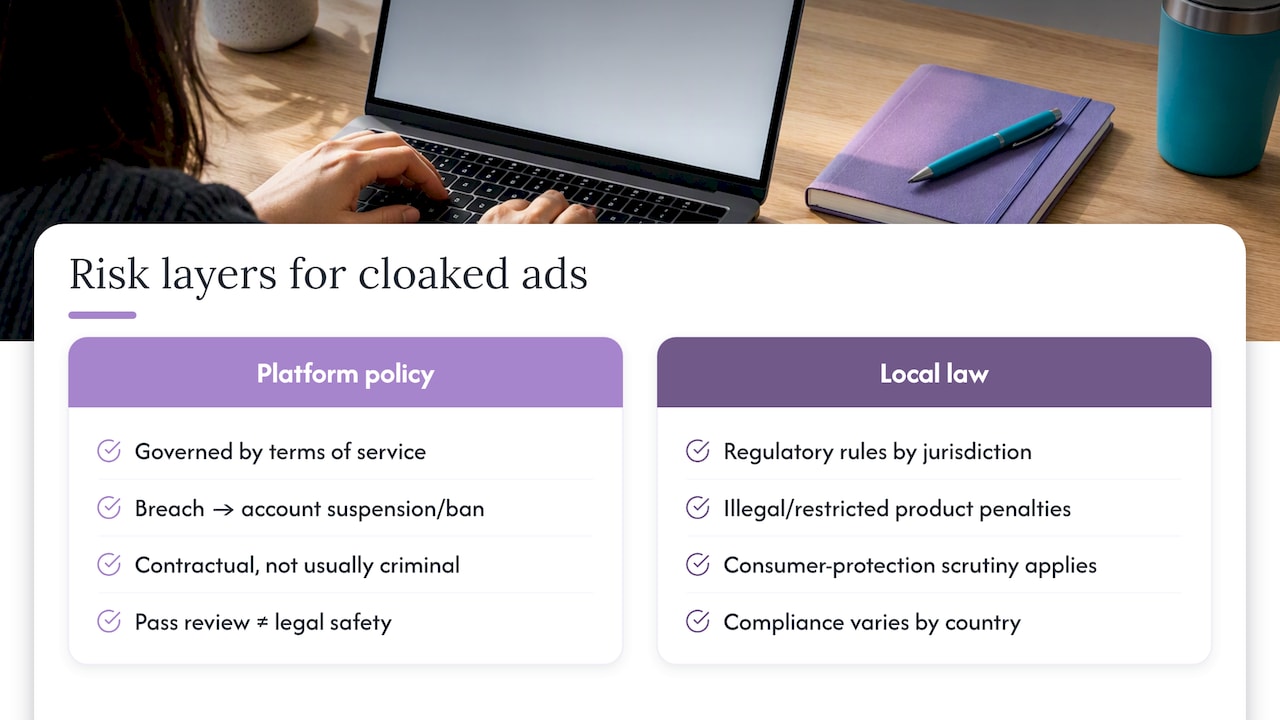
Device cloaking sits in a gray zone that platform terms of service govern more directly than most national advertising law. Violating Google’s or Meta’s advertising policies is a contractual breach, not typically a criminal matter on its own, but the underlying product category can introduce separate legal exposure. Advertising a product that is restricted or illegal in a given jurisdiction, such as certain cannabis derivatives, forex products, or pharmaceutical claims, carries its own regulatory risk independent of how the ad was delivered.
Jurisdiction complicates this further. A kratom product legal to sell in one country may be restricted or banned in another, and an ad campaign running globally can be compliant in one market and in violation in the next. Consumer protection regulators in several countries have also scrutinized deceptive advertising practices more broadly, meaning a cloaked ad that misleads consumers about a product’s nature can draw regulatory attention beyond the ad platform itself.
The safest operating assumption is that platform enforcement and local advertising law are two separate risk layers. Passing platform review does not establish legal compliance in every market you target, and operating legally in your home jurisdiction does not protect your ad account from platform-level suspension. Businesses in regulated categories should treat platform policy compliance and jurisdictional legal review as distinct checks, not one combined step, particularly when campaigns run across multiple countries with different rules for the same product category.
Case patterns: how cloaking detection plays out on live campaigns
The pattern across documented cloaking cases follows a consistent arc. A campaign launches, passes initial automated review because the white page served to the reviewer’s fingerprint looks compliant, and runs successfully for a period while generating real conversions. Detection then arrives through one of two paths: a stale filter list lets a reviewer or scanner through to the real offer page, or a third-party scanning service flags the discrepancy after the campaign is already live.
GeoEdge’s analysis of ad cloaking describes this exact dynamic in the malvertising context, where scammers hide malicious creatives until after approval, and platforms respond by scanning continuously rather than only at submission. The same mechanism applies to device cloaking used for restricted-but-legitimate verticals: the filter that worked at launch degrades as crawler infrastructure changes, and the campaign gets caught weeks or months into its run rather than at review.
The business impact of a detected cloak extends past the single disapproved ad. Platforms that classify cloaking as an egregious violation suspend the account outright, which halts every other active campaign tied to that account, not just the flagged one. When the account has linked payment methods or shared Business Manager assets, the enforcement action can cascade to related accounts as well. This is the core reason account segmentation and documented compliance steps matter: a single detection event on an unsegmented account risks the entire advertising operation, not one campaign.
Ethical considerations and how the industry views cloaking
Device cloaking draws a real ethical line that depends heavily on what is being hidden and from whom. Using the technique to let a legitimate, legal business reach customers despite an overly broad platform content filter reads very differently than using it to hide a genuinely deceptive or harmful offer from both reviewers and users.
The advertising industry’s enforcement stance, as reflected in both Google’s and Meta’s policy language, treats the practice itself as the violation, regardless of the underlying product’s legality. That framing exists because platforms cannot easily distinguish “legitimate business facing an overly strict filter” from “scammer hiding malware,” so they enforce against the behavior uniformly.
For media buyers, the practical ethical test worth applying is whether the end user would object to what they are seeing if they knew a reviewer saw something different. A CBD brand showing a reviewer a generic wellness page while showing the real customer the same legal product, at the same price, with accurate claims, sits in a different ethical position than a cloak that shows a reviewer a benign page while serving users a fraudulent offer or malware. Industry security researchers who study ad cloaking for fraud prevention focus almost entirely on the latter case, since that is where real consumer harm occurs. Media buyers operating in gray-area but legal verticals should hold themselves to the same test: does the real user see an honest offer, or does the cloak exist to deceive the person clicking, not just the platform reviewing.

Pre-launch checklist: what to test before you scale spend
Before putting real budget behind any cloaked campaign, run a short diagnostic pass rather than trusting the setup on faith.
- Do run multi-point scans from several reviewer-like fingerprints, not just one test case.
- Do test against a current crawler IP list, refreshed within the past week.
- Do validate that Client Hints and traditional User-Agent values match on every test device.
- Do document every test and configuration change for a future appeal.
- Don’t reuse creative assets or domains previously banned on the same platform.
- Don’t ignore account history when deciding how much risk a given account can absorb.
- Don’t assume low ad spend or small audience size makes detection less likely.
Rapid tests worth running before any launch: emulate the most common crawler fingerprints for your target platform, confirm redirect timing stays under 200 milliseconds, and manually verify that your white page and real offer page both render correctly end to end.
— Umar
Getting started with managed cloaking setup
If the technical overhead above sounds like more than your team wants to own in-house, that is exactly the gap managed setup closes. Rather than building and maintaining fingerprint filters yourself, we handle server configuration, reviewer detection logic, and ongoing filter updates so your campaigns stay live without you tracking crawler IP rotations every week.
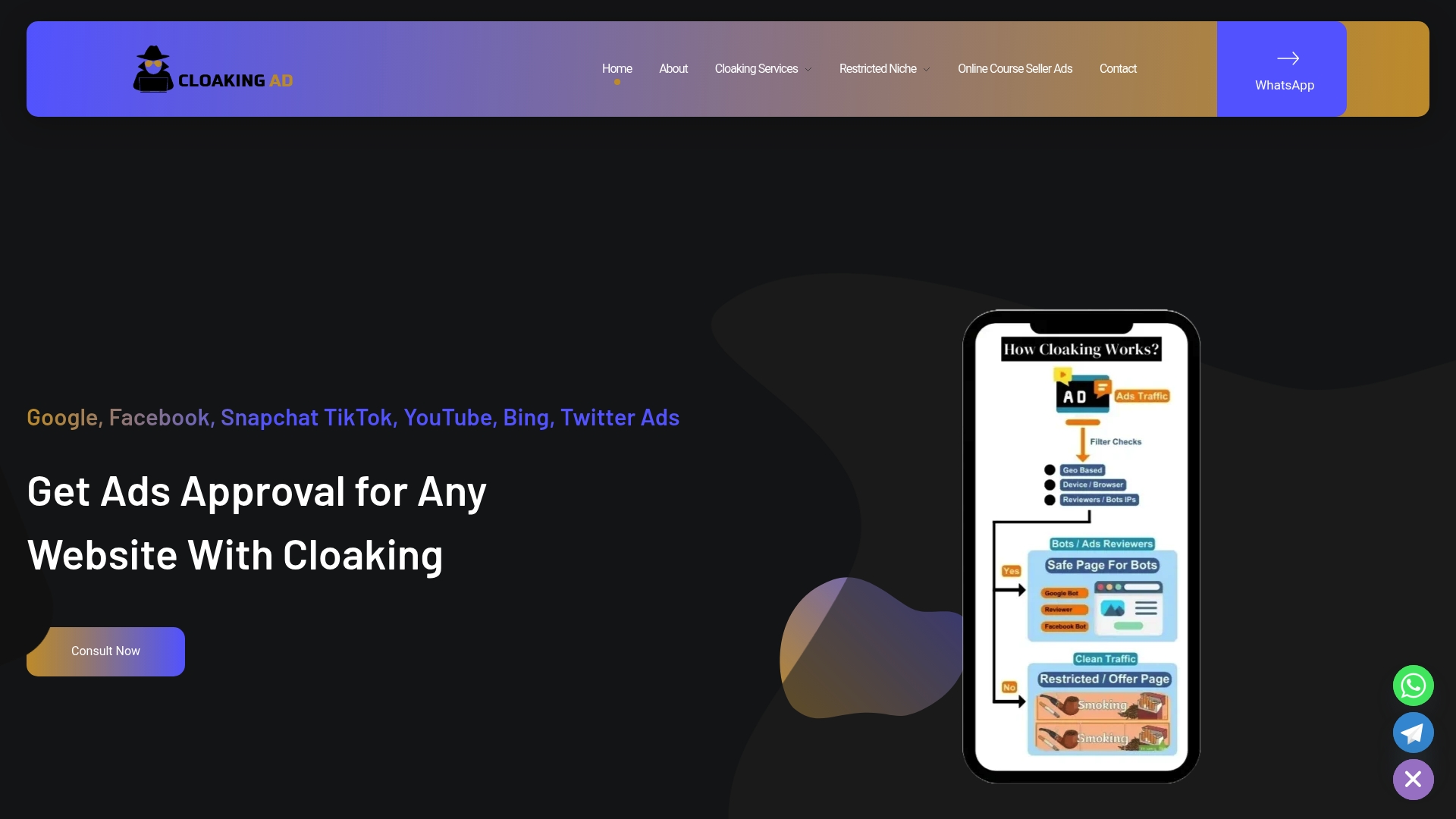
Engagements typically start with a consultation call to map your vertical and platform mix, move into a cloaking system setup built for your specific account, and continue with managed monitoring so filters stay current as platforms change their scanning behavior. For businesses in CBD, crypto, kratom, forex, and other restricted categories, this is the direct path to getting ads approved without rebuilding detection infrastructure from scratch on your own.
FAQ
What is cloaking in advertising?
Cloaking in advertising means showing different ad content or landing pages to an automated platform reviewer than to the real person who clicks the ad. Platforms classify this as a policy violation when the intent is to hide content that would otherwise fail review, as described in Google’s Circumventing systems policy.
What is cloaking in Google Ads?
In Google Ads specifically, cloaking falls under the Circumventing systems policy, which Google treats as an egregious violation. Google states that showing different content to its review systems than to actual users, in order to mask a policy violation, can result in immediate and permanent account suspension.
What is cloaking on Facebook ads?
On Facebook and Instagram, the relevant rule is Meta’s Evading enforcement standard, which prohibits creating or running ad assets designed to dodge review. Violations typically lead to advertising restrictions or penalties applied to the linked business assets, not just the individual ad.
What type of malware can cause unwanted ads to pop up?
Unwanted pop-up ads are often caused by adware, a type of malware that injects or redirects ad content without the user’s consent, frequently bundled with free software downloads or compromised browser extensions. This is a distinct issue from advertiser-side device cloaking, which involves an advertiser’s own ad serving behavior rather than malicious software on a user’s device.
Is device cloaking legal?
Device cloaking itself is primarily a platform policy violation rather than a universally defined crime, but the legal risk depends heavily on the underlying product and the jurisdiction where it is advertised. A business should treat platform compliance and local advertising law as two separate questions, since passing platform review does not guarantee legal compliance in every market a campaign reaches.
Sources
- Circumventing systems – Advertising Policies Help
- Understanding Ad Cloaking & Website Cloaking – GeoEdge University
- UserAgent targeting (BidRequest.device.sua) – Google developers